


Rolling out Microsoft Defender for Endpoint in a live environment quickly shows that success isn’t just about turning on features, it’s about ensuring the platform fits your organization’s security posture and operational reality.
Defender is a strong choice for many teams due to its tight integration with Microsoft 365, advanced threat detection, and automation capabilities. But to get real value, it must be aligned with your internal policies, governance structure, and day-to-day workflows.
This post shares lessons learned from hands-on deployments, what worked, what didn’t, and what I’d recommend to anyone looking to get the most out of Defender. Whether you’re just getting started or refining your setup, these insights can help you build a more effective and resilient endpoint security strategy.
Common Misconfigurations and How to Avoid Them
Defender for Endpoint is powerful, but it’s also easy to misconfigure if you’re not intentional.
One of the most common issues is overusing exclusions, especially when trying to reduce false positives. It’s tempting to exclude entire folders or processes, but without clear justification, you risk losing visibility into real threats.
Another frequent challenge is improper onboarding. Devices may fail to report correctly if prerequisites, such as sensor updates or network connectivity, aren’t properly configured.
Then there’s policy overlap. Conflicts between Group Policy (GPO) and Intune settings can create inconsistent behavior across endpoints, making troubleshooting difficult.
To avoid these issues:
- Use deployment rings to roll out changes gradually
- Test policies with pilot groups before going wide
- Monitor onboarding status in the Defender portal to catch issues early
These steps help ensure Defender is deployed cleanly, consistently, and with minimal disruption.
Aligning Defender with Organizational Security Policies
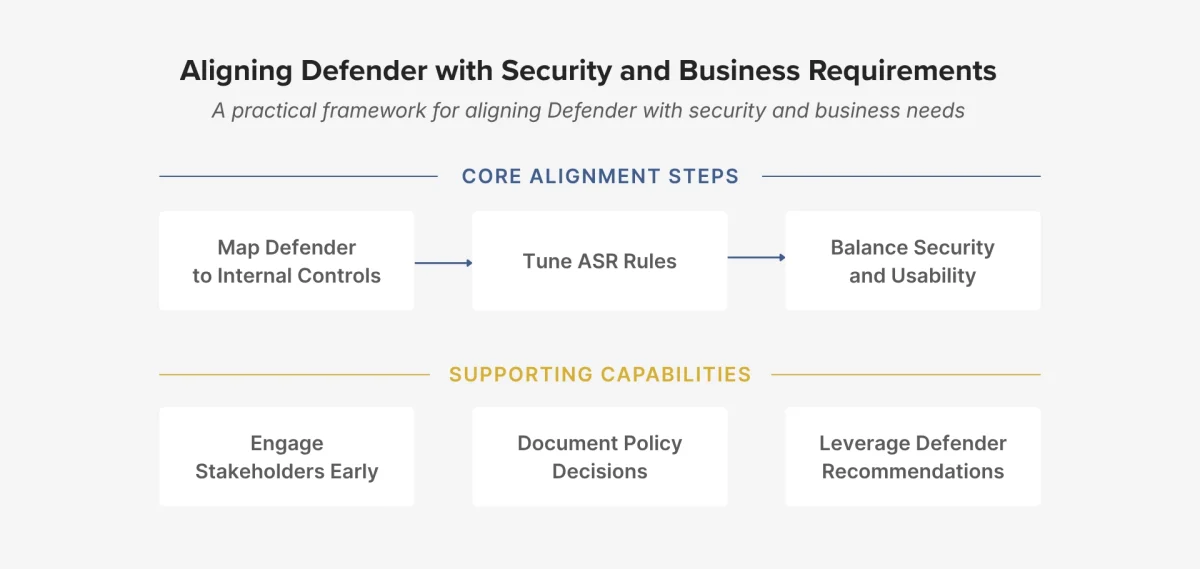
Defender delivers the most value when it’s aligned with your organization’s security controls and business operations.
This means mapping features, such as Attack Surface Reduction (ASR) rules and endpoint detection, directly to your compliance requirements and risk framework.
ASR rules are especially impactful, but they must be applied carefully. When deployed too broadly, they can disrupt legitimate workflows. For example, blocking Office macros may improve security posture, but could impact finance or operations teams that rely on them.
What works in practice:
- Engage stakeholders early: involve IT, compliance, and business units
- Document your decisions so you can track changes and justify configurations
- Leverage Defender’s built-in recommendations to guide tuning and prioritize what matters most
This approach helps strike the right balance between security and usability.
Integration with Microsoft Sentinel: What Worked, What Didn’t
Integrating Defender with Microsoft Sentinel significantly enhances visibility and response capabilities, especially for organizations looking to centralize security operations.
Real-time alert ingestion is a big win, and playbooks make it easy to automate actions like isolating devices or sending notifications. Plus, cross-tenant visibility is a huge advantage in complex environments.
However, the integration also introduces challenges. Alert noise can be overwhelming if analytics rules aren’t properly tuned. Role-based access across both platforms can be tricky to manage, especially when trying to enforce least privilege. Additionally, data latency may occasionally impact response times.
To get the most out of the integration:
- Start with high-fidelity, actionable alerts
- Use KQL to build custom dashboards and queries
- Regularly review and refine incident rules to keep them relevant
These practices help ensure you’re getting meaningful insights, without drowning in noise.
Conclusion
Microsoft Defender for Endpoint is more than just a security tool, it’s a critical component of a modern defense strategy.
Its real value comes from deploying it intentionally:
- Avoiding common misconfigurations
- Aligning with organizational policies
- Integrating with platforms like Sentinel for full visibility and automation
If you’re rolling out Defender or looking to improve your current setup, these lessons can help you move faster, avoid headaches, and build a stronger security posture. The more deliberate your approach, the more Defender can deliver, not just in protection, but in operational efficiency and long-term resilience.
If you’re unsure whether your Defender deployment is truly optimized or just ‘configured,’ we can help you assess where you stand and identify the fastest path to a more resilient security posture.
📅 Book a Strategy Conversation
📩 Prefer to reach out in writing? Submit the contact form.
Or contact us directly at info@bravocg.com